- iOS:
LocalAuthorityPostcodeEntryViewin govuk-once/govuk-mobile-ios-app/Production/govuk_ios/Views/Home/LocalAuthority/LocalAuthorityPostcodeEntryView.swift at 1e520fc1 - iOS:
roundedBorder(cornerRadius:borderColor:borderWidth:)in govuk-once/govuk-mobile-ios-gov-kit/GovKitUI/Sources/Helpers/RoundedBorder.swift at ad8590b - Android:
LocalLookupScreenin govuk-once/govuk-mobile-android-app/feature/local/src/main/kotlin/uk/govuk/app/local/ui/LocalLookupScreen.kt at 16621861 - Figma: none linked yet
Text field
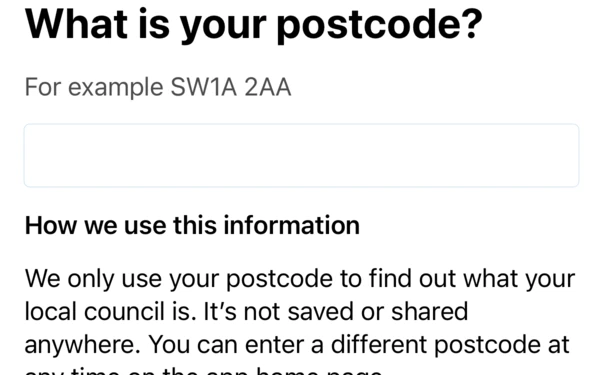
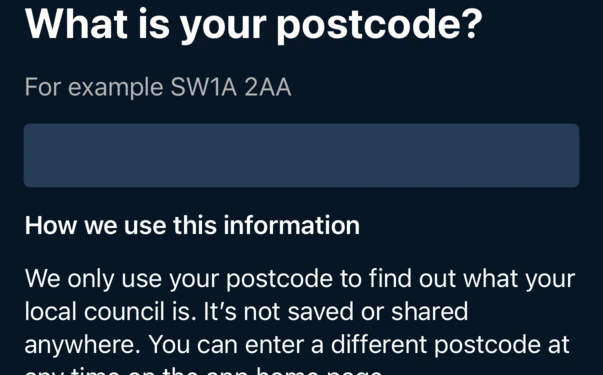
Asks the user to type a short answer, such as their postcode, under a heading asking the question, with a hint of what to type and, if what they typed won't do, an error saying what to do.
GOV.UK app component
In a form
Put the field in a form, so pressing Return on the keyboard sends what the user typed to the form’s action, as the field’s name. A prototype can then show the next page, or the same page with an error:
<form action="council.html">
  <govuk-app-heading level="1" size="title-1">What is your postcode?</govuk-app-heading>
  <govuk-app-text-field type="postcode" name="postcode" label="Postcode" hint="For example SW1A 2AA"></govuk-app-text-field>
</form>
Errors
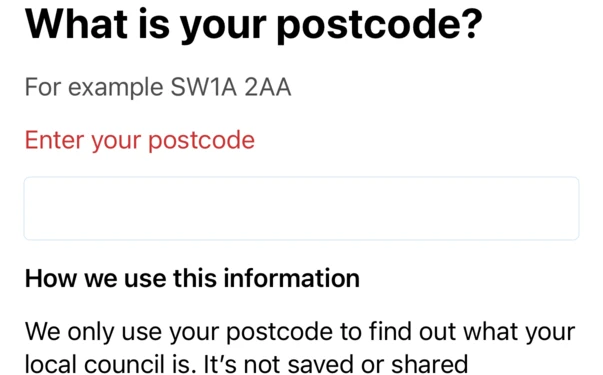
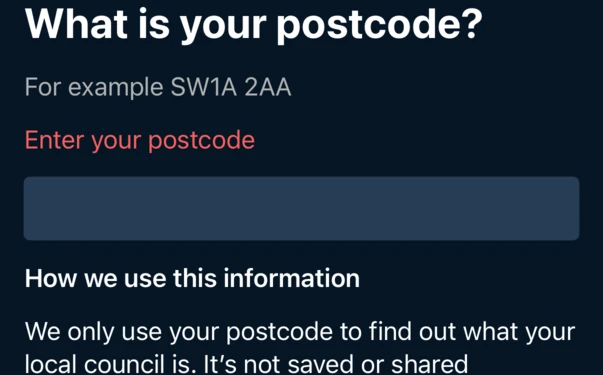
The app shows an error above the field, in red, and moves VoiceOver to it. Here, the field tells screen readers it’s invalid, and they hear the error after its label and hint when they reach it. To show one, set error, for example when the page loads with an empty postcode.
Known differences from the app
- The keyboard is the phone’s or computer’s own, not iOS’s.
- The field shows it’s being typed in with the yellow focus outline as well as its caret, as the app’s other controls do when they’re focused from a keyboard.
- Screen readers aren’t moved to the error when it appears.
Examples
A postcode
HTML
<govuk-app-heading level="1" size="title-1">What is your postcode?</govuk-app-heading>
<govuk-app-text-field type="postcode" name="postcode" label="Postcode" hint="For example SW1A 2AA"></govuk-app-text-field>
With an error
HTML
<govuk-app-heading level="1" size="title-1">What is your postcode?</govuk-app-heading>
<govuk-app-text-field type="postcode" name="postcode" label="Postcode" hint="For example SW1A 2AA" error="Enter your postcode"></govuk-app-text-field>
Inputs
| Attribute | Type | Default | Description |
|---|---|---|---|
label |
string |
The field's name for screen readers, such as Postcode. It isn't shown: the heading above asks the question. | |
hint |
string |
Shown above the field, in grey, saying what to type, such as For example SW1A 2AA. | |
error |
string |
Shown above the field, in red, when what the user typed won't do, saying what to do, such as Enter your postcode. | |
type |
"text" | "email" | "tel" | "url" | "password" | "postcode" |
text |
What's typed, so the phone shows the keyboard for it. postcode types in capitals, with the browser offering the user's own. |
name |
string |
The name what the user typed is sent as, in a form. | |
value |
string |
Text already in the field. | |
placeholder |
string |
What the field shows until the user types. The app's postcode field has none: put what to type in the hint, which stays. | |
autocomplete |
string |
What the browser may fill in for the user, such as email or postal-code. |
Content
None.
Outputs
input: From its field, as the user types.change: From its field, when the user leaves it having changed it.
Rules
- Put it under a heading asking the question, such as What is your postcode?, and give it a label for screen readers with the answer's name, such as Postcode.
- Ask for one thing on a screen, with a primary button below to carry on.
- Put an example in the hint, not the placeholder, so it's still there once the user starts typing.
- Say what to do in the error, not what went wrong: Enter your postcode, not Postcode is empty.
- Put it in a form, so pressing Return on the keyboard sends it.
When not to use it
| When | Use instead |
|---|---|
| To search | govuk-app-search-field |
| To ask GOV.UK Chat | govuk-app-chat-input |
| For something that's on or off | govuk-app-toggle |
| For a choice from a short list | govuk-app-grouped-list-row type="selectable" |
The iOS, Android and Figma sources it was built from
Screenshots of the app's own component, to compare the examples with
iOS