- iOS:
BaseTabBarControllerin govuk-once/govuk-mobile-ios-app/Production/govuk_ios/Views/Common/BaseTabBarController.swift at fc2b3b1d - iOS:
UITabBarItemAppearance.govUKin govuk-once/govuk-mobile-ios-app/Production/govuk_ios/Extensions/UIKit/UITabBarItemAppearance+GOVUK.swift at fc2b3b1d - iOS:
UITabBarItem .home, .chat, .settingsin govuk-once/govuk-mobile-ios-app/Production/govuk_ios/Extensions/UIKit/UITabBarItem+Convenience.swift at fc2b3b1d - iOS:
TabCoordinatorin govuk-once/govuk-mobile-ios-app/Production/govuk_ios/Coordinators/TabCoordinator.swift at fc2b3b1d - Figma: none linked yet
- Apple Human Interface Guidelines: Tab bars
- Material Symbols, the icons it draws
Tab bar
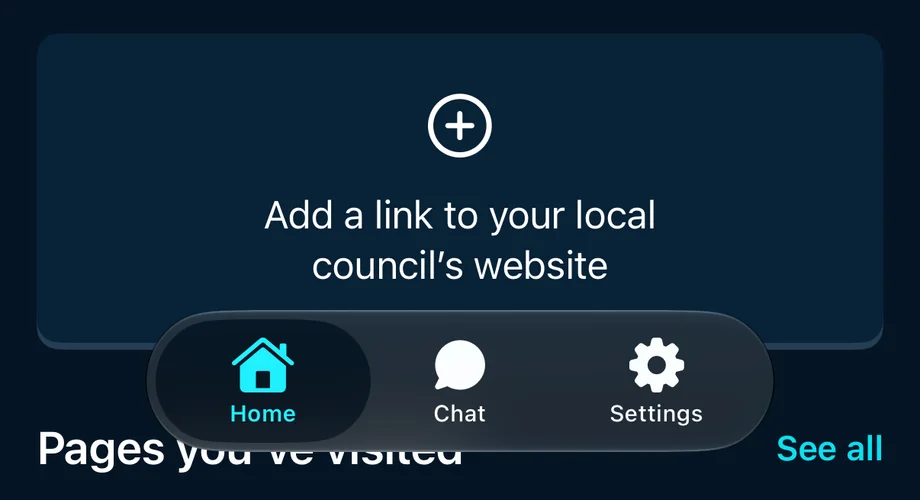
Moves between the app's top-level sections: Home, Chat and Settings. It floats at the bottom of every screen in those sections, and shows which one the user is in.
Native component
Over a screen
The tab bar sticks to the bottom of the screen, and the content scrolls under its glass. Scroll these to see it.
Topics
Business. Driving and transport. Money and tax. Travel abroad. Benefits. Childcare and parenting. Citizenship and living in the UK. Crime, justice and the law. Disabled people. Education and learning. Employing people. Environment and countryside. Housing and local services. Visas and immigration. Working, jobs and pensions.
Your local services
Add a link to your local council’s website to find services near you, such as bin collections, council tax and parking permits.
Pages you’ve visited
Check if you need a UK visa. Renew or replace your adult passport. Check your State Pension age. Tax your vehicle. Find out how much Income Tax you pay. Register to vote. Apply for a provisional driving licence.
Icons
The app’s tabs use SF Symbols, which may only be used on Apple’s platforms, so the tab bar draws Material Symbols instead, rounded and filled, from Google Fonts. Give a tab any symbol’s name as its icon. The closest to the app’s are home, chat_bubble and settings.
Known differences from the app
- The glass is a blurred, translucent fill. It doesn’t bend the content behind it, catch the light at its edges, or change from light to dark with what’s under it.
- Pressing a tab doesn’t swell it into a lens, and the selection doesn’t slide from one tab to the next.
- Holding a tab doesn’t show the larger copy of it that iOS shows people who use large text.
Examples
Home selected
HTML
<govuk-app-tab-bar>
  <govuk-app-tab-bar-item icon="home" name="home" selected>Home</govuk-app-tab-bar-item>
  <govuk-app-tab-bar-item icon="chat_bubble" name="chat">Chat</govuk-app-tab-bar-item>
  <govuk-app-tab-bar-item icon="settings" name="settings">Settings</govuk-app-tab-bar-item>
</govuk-app-tab-bar>
Settings selected, without Chat
HTML
<govuk-app-tab-bar>
  <govuk-app-tab-bar-item icon="home" name="home">Home</govuk-app-tab-bar-item>
  <govuk-app-tab-bar-item icon="settings" name="settings" selected>Settings</govuk-app-tab-bar-item>
</govuk-app-tab-bar>
Tabs that link to other pages
HTML
<govuk-app-tab-bar>
  <govuk-app-tab-bar-item icon="home" href="#home" selected>Home</govuk-app-tab-bar-item>
  <govuk-app-tab-bar-item icon="chat_bubble" href="#chat">Chat</govuk-app-tab-bar-item>
  <govuk-app-tab-bar-item icon="settings" href="#settings">Settings</govuk-app-tab-bar-item>
</govuk-app-tab-bar>
Inputs
It takes no attributes.
Content
Two to five <govuk-app-tab-bar-item> elements, one for each tab, in order. Each takes an icon attribute, the name of a Material Symbol (such as home, chat_bubble or settings); an href, to make the tab a link to another page, or name and value, to tell it apart as a button; and selected, on the tab of the section the screen is in. Its label is what is written between its tags.
Outputs
click: From the link or button a tab draws, when it is pressed. A tab with an href goes to its page. A tab without one is a button, and pressing it selects it, as a native tab bar does; use event.target.closest('button').name to tell which was pressed and show its section.
Rules
- Use it only on the top-level screens of the app's sections. Hide it on screens a section pushes on top, and on modals, as the app does.
- Put it last in the screen, after the content. It sticks to the bottom of the screen and the content scrolls under it.
- Use the app's own tabs, in its order: Home (icon home), Chat (icon chat_bubble) and Settings (icon settings).
- Select exactly one tab: the one for the section the screen is in.
- Keep each label to one short word. Labels don't wrap, and are cut off if they are too long.
- In a prototype of several pages, give each tab an href to its section's first page, and mark that tab selected on each of its pages.
When not to use it
| When | Use instead |
|---|---|
| On a screen that asks the user to act, such as confirm or continue | govuk-app-button-stack |
| On a screen pushed on top of another, or a modal | Leave it out, and give the screen a back button or a close action in its navigation bar. |
| To switch between views of the same thing | govuk-app-segmented-control |
The iOS, Android and Figma sources it was built from
Screenshots of the app's own component, to compare the examples with
iOS