- iOS:
startLinkAccount, modalPresentationStyle = .fullScreenin govuk-once/govuk-mobile-ios-app/Production/govuk_ios/Coordinators/DVLA/DrivingTopicWidgetCoordinator.swift at fc2b3b1d - iOS:
ServiceAccountConsentViewin govuk-once/govuk-mobile-ios-app/Production/govuk_ios/Views/ServiceAccount/ServiceAccountConsentView.swift at fc2b3b1d - iOS:
fills.surfaceFullScreenLinkAccountin govuk-once/govuk-mobile-ios-app/Production/govuk_ios/Extensions/GovKit/GOVUKColors+ServiceAccount.swift at fc2b3b1d - Android:
BookendToWebScreenin govuk-once/govuk-mobile-android-app/design/src/main/kotlin/uk/gov/govuk/design/ui/component/Screen.kt at 9952400f - Android:
DvlaLinkIntroScreenin govuk-once/govuk-mobile-android-app/feature/dvla/src/main/kotlin/uk/gov/govuk/dvla/ui/DvlaLinkIntroScreen.kt at 9952400f - Figma: none linked yet
- Apple Developer Documentation: UIModalPresentationStyle.fullScreen
Full-screen cover
Presents a screen over the one the user was on, covering it entirely, for a journey that takes over the app until it's finished or closed, such as adding a driver and vehicles account. Unlike a sheet, nothing of the screen behind shows.
Native component
Presenting it
A full-screen cover is a page of its own, as a sheet is. To present one from a screen, link to that page, and give the cover present there, so it comes up from the bottom when the page loads:
<govuk-app>
  <govuk-app-full-screen-cover present>
    <govuk-app-screen slot="behind">
      …the screen it was presented from…
    </govuk-app-screen>
    <govuk-app-screen background="green">
      …the cover's screen…
    </govuk-app-screen>
  </govuk-app-full-screen-cover>
</govuk-app>
Its later screens are pages with the same cover, without present. To close it, link back to the screen it was presented from.
Green screens
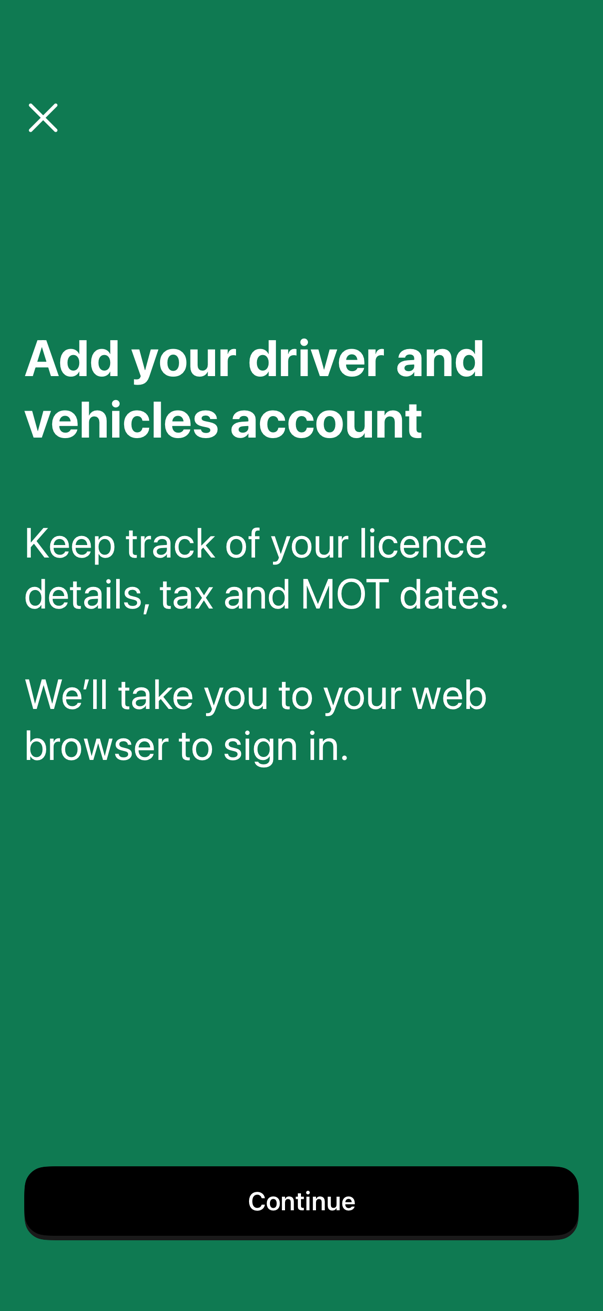
The app uses a full-screen cover to add a driver and vehicles account. Its screens are green, the same in light and dark, with white text, a black button, and the close action on the left. The Android app and the app’s analytics call them bookends: they come before and after the user signs in on the web. Draw one with:
background="green"on the screen, which also sets its content further down, as the app doessize="title-1"on its text, which the app sets larger than Bodyvariant="black"on its buttonslot="leading"on the navigation bar’s close action
Known differences from the app
- The app’s button stack has no divider above the button until the content scrolls under it. On a green screen, there’s never one here.
- Its title is 48pt below the navigation bar, on the 8pt grid, as near as it can be to where the app shows it in iOS 26. The app’s code asks for 66pt, which its older snapshots show.
- The app’s text is 24pt below the title and 16pt below each paragraph. Here it is 16pt below each.
- In landscape, the app sets the title and text a size smaller and the title nearer the top. It doesn’t here.
- Closing it goes straight to the page behind: it doesn’t slide down first.
Examples
Adding a driver and vehicles account
HTML
<govuk-app-full-screen-cover>
  <govuk-app-screen background="green">
    <govuk-app-nav-bar>
      <govuk-app-nav-bar-item icon="close" name="close" slot="leading">Close</govuk-app-nav-bar-item>
    </govuk-app-nav-bar>
    <govuk-app-heading level="1" size="large-title">Add your driver and vehicles account</govuk-app-heading>
    <govuk-app-text size="title-1">Keep track of your licence details, tax and MOT dates.</govuk-app-text>
    <govuk-app-text size="title-1">We’ll take you to your web browser to sign in.</govuk-app-text>
    <govuk-app-button-stack slot="footer">
      <govuk-app-button variant="black" name="continue">Continue</govuk-app-button>
    </govuk-app-button-stack>
  </govuk-app-screen>
</govuk-app-full-screen-cover>
Coming up over the screen it was presented from
HTML
<govuk-app-full-screen-cover present>
  <govuk-app-screen slot="behind">
    <govuk-app-nav-bar title="Driving" large-title back></govuk-app-nav-bar>
    <govuk-app-text>Add your driver and vehicles account to see your licence details, tax and MOT dates.</govuk-app-text>
  </govuk-app-screen>
  <govuk-app-screen background="modal">
    <govuk-app-nav-bar title="A full-screen cover">
      <govuk-app-nav-bar-item icon="close" name="close" slot="leading">Close</govuk-app-nav-bar-item>
    </govuk-app-nav-bar>
    <govuk-app-text>Nothing of the screen behind shows once it's up.</govuk-app-text>
  </govuk-app-screen>
</govuk-app-full-screen-cover>
Inputs
| Attribute | Type | Default | Description |
|---|---|---|---|
present |
boolean |
false |
Brings the cover up from the bottom when the page loads, as UIKit presents it. Give it to the first screen of the journey, and not to the screens after it, which are already in the cover. |
label |
string |
The cover's name for screen readers. Leave it off if its screen has a heading or a navigation bar title. |
Content
The cover's screen, a <govuk-app-screen>. Optionally, the screen it was presented from, with slot="behind", which is seen only while the cover comes up over it, and can't be used.
Outputs
None.
Rules
- Put a full-screen cover directly in a <govuk-app>, in place of a screen. Give the root a size, as for a screen.
- Use a sheet for most modals, as the app does. Use a full-screen cover only where the app does: for a journey that takes over the app, such as adding a driver and vehicles account.
- Give its screen a way out: a close action on the left of its navigation bar, with slot="leading". It can't be pulled down to close.
- Give present only to the first screen of the journey. Later screens of the same journey are already in the cover.
- To draw the app's green screens, give its screen background="green", its text size="title-1", and its button variant="black".
When not to use it
| When | Use instead |
|---|---|
| For a task the user finishes or cancels before going back, such as signing out or choosing a country | govuk-app-sheet |
| For the next screen of a journey, pushed on top of the last | A govuk-app-screen of its own, with a back button in its navigation bar. |
| For a few things to do with something on a card | govuk-app-menu-button |
The iOS, Android and Figma sources it was built from
Screenshots of the app's own component, to compare the examples with
iOS