1.4.3 Contrast (Minimum) (AA)
WCAG says:
“The visual presentation of text and images of text has a contrast ratio of at least 4.5:1” (with exceptions)
Understanding 1.4.3 Contrast (Minimum)
What this means
What is a contrast ratio?
A contrast ratio is a numerical value comparing the luminance (brightness) of foreground and background colours.
Values range from 1:1 (no contrast) to 21:1 (maximum contrast).
The higher the ratio, the greater the contrast and legibility.
Requirements
- Standard text: This needs to have a contrast ratio of at least 4.5:1 against its background.
- Large text: For text at least 18pt (around 24px), or bold text at least 14pt (around 19px), the ratio needs to be at least 3:1.
- Inactive elements, logos and decorative text are exempt.
Why it matters
Good contrast makes text easier to read — especially for partially sighted users and people with low vision. Most people find content easier to perceive if the contrast between text and its background is high enough.
Low contrast text is one of the most common accessibility issues found on websites.
How to check
Automated tools
The following automated checkers can often detect contrast issues by comparing text and background colours. They are both available as browser extensions in Chrome, Edge and Firefox:
Manual methods
- Use browser developer tools to identify text and background colours.
- Enter colour values into the WebAIM Contrast Checker.
- Use a colour picker tool, such as the TPGi Colour Contrast Analyser. For small text, zoom in to avoid grainy samples and inaccurate readings.
Colours are usually written using a hex code format. For example, pure blue is #0000FF.
How to test in detail for 1.4.3 Contrast (Minimum)
Good examples
Heading and link on GOV.UK
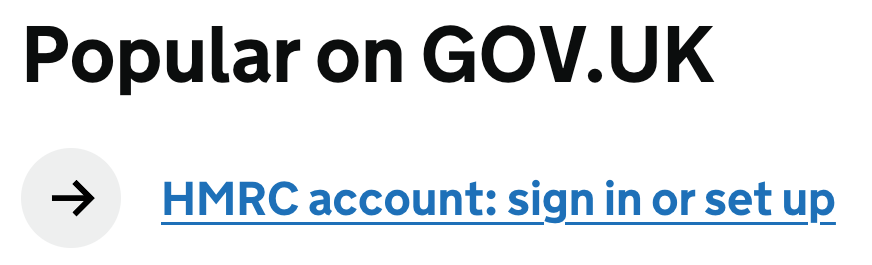
The heading “Popular on GOV.UK” uses black text #0B0C0C on a white background #FFFFFF, achieving a contrast ratio of 19.6:1.
Blue link text (“HMRC account…”) #1D70B8 on white has a contrast ratio of 5.2:1.
Focused link
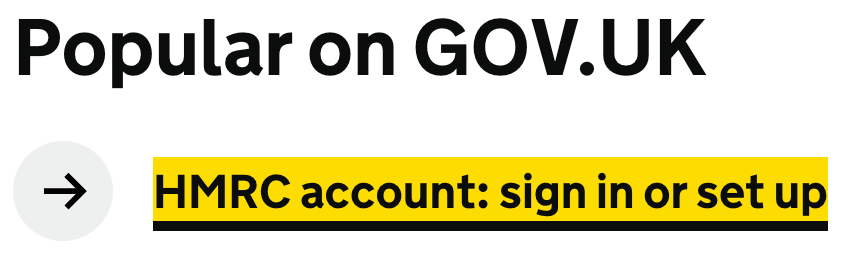
When the link receives keyboard focus, the text darkens to black #0B0C0C for better readability against the yellow highlight background #FFDD00, achieving a contrast ratio of 14.5:1.
Common mistakes
Low contrast text

This light purple text on a violet background has a contrast ratio of 2.2:1, below the 4.5:1 required for standard text.
Low contrast text on focus

This blue link text does not have enough contrast when it has keyboard focus - the contrast ratio is around 4.1:1.
Related success criteria
This success criterion only relates to the contrast of text.
- 1.4.1 Use of Colour requires that colour is not the only way to convey information.
- 1.4.6 Contrast (Enhanced) encourages you to use a minimum contrast ratio of 7:1 to meet level AAA.
- 1.4.11 Non-text Contrast covers the contrast of anything meaningful other than text.