2.4.11 Focus Not Obscured (Minimum) (AA)
Make sure that people can always see any components that have keyboard focus.
What WCAG says:
When a user interface component receives keyboard focus, the component is not entirely hidden due to author-created content.
Check the official guidance for Understanding 2.4.11 Focus Not Obscured (Minimum)
What this means
When an interactive thing like a button or link receives keyboard focus, it is not completely hidden by anything else on the page, like a cookie banner or a menu.
Why it matters
This ensures that people with mobility or dexterity impairments who do not use a mouse or touchscreen can navigate using a keyboard. It helps people know where a focused component is, rather than it being hidden behind something.
How to check
Use the Tab key to navigate through a page and focus on menus, buttons and links.
Look for scenarios where a focused item could end up behind something else, such as a cookie banner, menu, or a fixed banner at the top of the screen. In these scenarios, check that no focused components are completely hidden behind anything else. It is also worth checking scenarios at higher zoom levels, such as 200% and 400%, as menus and banners can behave differently.
It’s OK if focused components can be made visible without moving the focus, for example by pressing the Escape key to dismiss a menu, or using the arrow keys to bring it into view.
How to test in detail for 2.4.11 Focus Not Obscured (Minimum)
Good examples
Focus is restricted to the cookie banner
On a tourism website, the cookie banner appears on top of the page. However, keyboard focus stays within the cookie banner. This means that focused components are never obscured by the cookie banner.

Cookie banner does not obscure page content
On the National Health Service (NHS) website for England, the cookie banner appears at the top of the screen, above the rest of the page, without obscuring page content. This means that the “My account” link can receive keyboard focus without being obscured by the cookie banner.

Common mistakes
Cookie banner obscures a focused link
On a council website, the cookie dialogue covers part of the page, and things behind it can receive keyboard focus. In this case, a link underneath the cookie dialogue has keyboard focus. Part of the link’s focus indicator is visible below the dialogue, but the link itself is obscured.
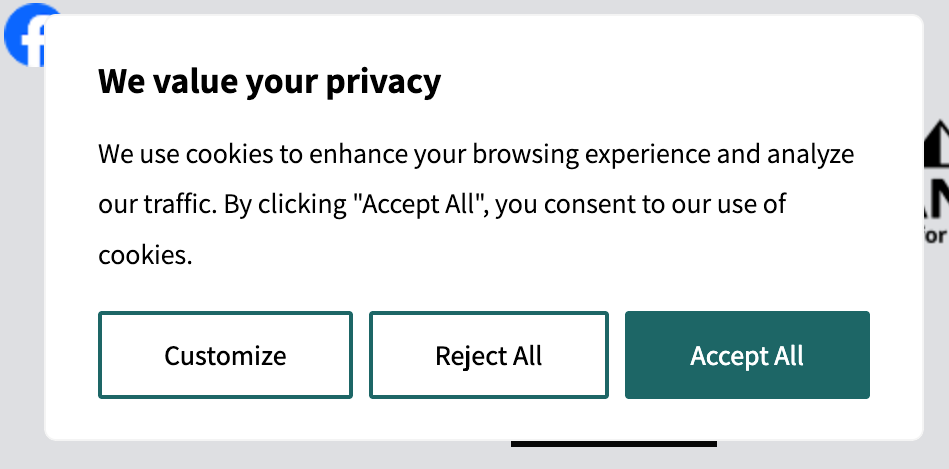
This could be resolved by either restricting keyboard focus to the cookie dialogue when it’s active, or positioning the cookie banner in a way that does not obscure other focusable content on the page.
Related success criteria
2.4.7 Focus Visible (AA) relates to focus indicators being visible. If a component has no visible focus indicator at all, it fails Focus Visible. If it has a visible focus indicator, but the component is hidden behind something else, it fails Focus Not Obscured.
The stricter AAA criterion, explained in the official guidance on Understanding 2.4.12 Focus Not Obscured (Enhanced) encourages you not to hide components at all when they are focused.
Last updated
This page was last updated in December 2025.